Interactive comparison slider Free
Drag-to-reveal before/after slider (powered by Cocoen) that feels natural on desktop and touch.
A complete toolkit for medical and aesthetic practices — from a simple comparison slider to full, filterable case studies with watermarking and consent. Pro features are marked below.
A closer look at the features that make MBA Gallery stand out. Open the live demo →
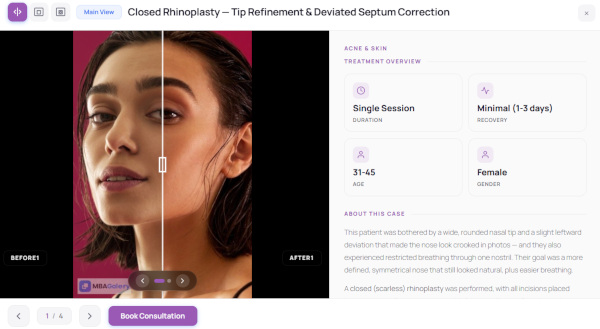
Let visitors drag to reveal the transformation. The comparison slider feels natural on desktop and touch — and you can open each case in split, before-only, after-only or side-by-side views.
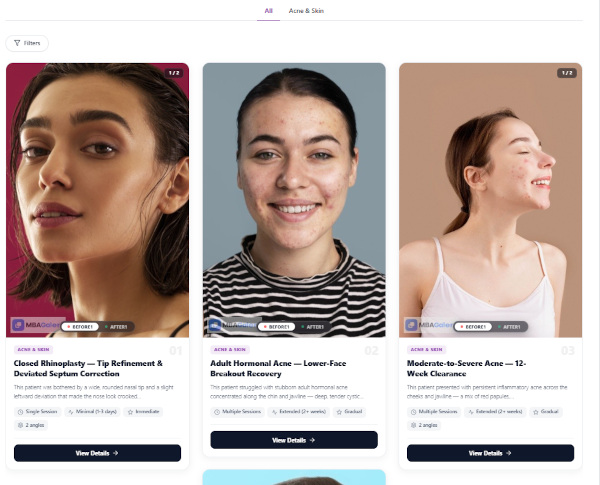
A premium, Pinterest-style gallery with a click-to-open filter drawer and an immersive case modal that includes a Treatment Overview panel and an “About this case” write-up.
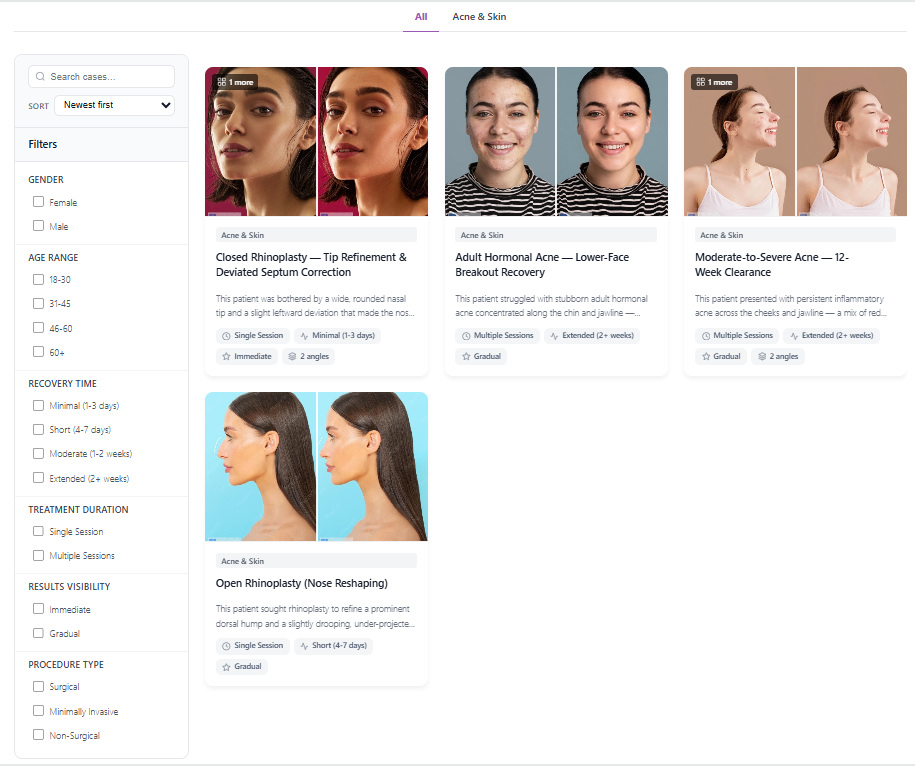
Help patients find results relevant to them with six built-in filters (plus unlimited custom ones), instant search, and sort — all shareable through the URL with deep-linking.
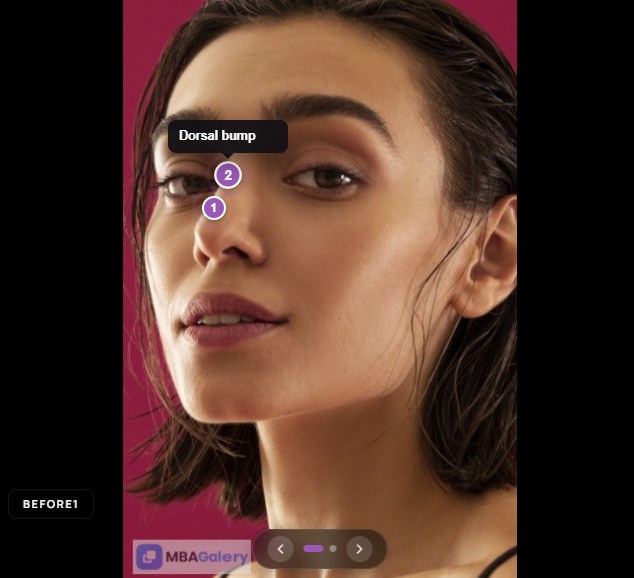
Drop numbered markers directly on your images to highlight exactly what changed. Each hotspot carries a title and note, and visitors reveal them on hover or tap.
Protect your work with a text or logo watermark in nine positions — your originals are never modified. Add a sensitive-content consent overlay for responsible presentation.
Show transformations the way patients want to see them.
Drag-to-reveal before/after slider (powered by Cocoen) that feels natural on desktop and touch.
Open cases in split-slider, before-only or after-only — your choice of default.
Show before and after next to each other instead of a slider, great for subtle results.
Rename the labels (or hide them entirely) to match your clinic’s language.
Drop numbered markers (up to 30 per image) with titles and notes to highlight exactly what changed.
A gallery that fits your brand and any WordPress theme.
A clean, mobile-first grid with a category carousel and case modal out of the box.
Pinterest-style cards with a click-to-open filter drawer and a polished case modal with a Treatment Overview panel.
Off, always-on, or auto (follows the visitor’s system preference).
Choose auto / 2 / 3 / 4 columns and card aspect ratios (1:1, 4:3, 3:2).
Set a primary brand color — a solid hex or a CSS gradient — used across the gallery.
Renders consistently inside any theme, with ARIA roles and full keyboard navigation.
Help patients find the results that matter to them.
Organize cases into categories, with hierarchical subcategory pills in Pro.
Six built-in filters — gender, age range, recovery time, treatment duration, results visibility and procedure type.
Add your own filters with custom options, reorder them, and enable/disable as needed.
Let visitors search across cases and sort by newest, oldest or title.
Filters, search and sort are reflected in the URL. A ?mbcase=ID link opens a specific case directly.
Turn a single photo pair into a complete, credible case story.
Add unlimited before/after pairs per case — multiple angles, stages or sessions — each with its own label.
Capture gender, age, recovery, duration, results and procedure type, shown as clean stat tiles.
A full editor for an "About this case" write-up with formatting and media.
Crop uploads to a consistent size right in the editor for a tidy, uniform grid.
Built for sensitive medical imagery and compliant practices.
Apply a text or logo watermark with 9 positions, opacity, size and padding. Originals are never modified — watermarked copies are created.
Auto-apply on save, plus bulk apply, remove-all, clear-&-reapply and a test preview.
Gate the gallery behind a customizable consent notice that can remember the visitor’s choice.
Deter casual right-click saving and image dragging on the gallery and modal.
Drop galleries anywhere and integrate with your stack.
Embed the full gallery anywhere with [medbeafgallery] and a few simple attributes.
Show a sliding carousel of a category with [mba_category_carousel] (autoplay, loop, navigation).
Feature one case inline anywhere with [mba_case id="123"], including its treatment overview.
Add a "Book consultation" button inside the case modal, linked wherever you like.
Gallery and category data is exposed over a clean REST API for custom integrations.
| Feature | Free | Pro |
|---|---|---|
| Before/after comparison slider | ||
| Responsive grid gallery | ||
| Categories & category carousel | ||
| Image cropping tool | ||
| Customizable brand color | ||
| Before/after view switching | ||
| Modal case navigation | ||
| REST API | ||
| Number of cases | Up to 12 | Unlimited |
| Number of categories | Up to 4 | Unlimited |
| Multiple image pairs per case | ||
| Subcategories | ||
| Smart & custom filters (age, gender, procedure…) | ||
| Search & sort | ||
| Deep-linking & shareable views | ||
| Masonry layout + redesigned modal | ||
| Dark mode | ||
| Image watermarking (text / logo) | ||
| Image protection | ||
| Image annotations / hotspots | ||
| Sensitive-content consent overlay | ||
| Detailed case info / Treatment Overview | ||
| Carousel & single-case shortcodes | ||
| Modal call-to-action button | ||
| Priority support | ||
| Download free | Get Pro |